Claude for Excel, tested on the tasks from my own Excel tutorials
I just finished a series of eighteen Excel tutorials - XLOOKUP, pivot tables, SUMIF, conditional formatting, all of it. At the same time, everywhere I look, people say AI makes all of this pointless. Claude has its own Excel add-in now. So I wanted to know: did I just waste my time?
The test is simple. I take the exact tasks from my own tutorials, give them to Claude, and check every answer like a teacher - not by trusting what it says, but by checking the actual numbers.
A properly ugly test file
Three hundred orders. Fifteen copy-paste duplicates. 171 dates that are actually text, in five formats. Quantities with a leading space, so Excel thinks they are text. Customer names with random spaces, some in capitals, some in lowercase. And because I generated the data myself, I know the correct answer to every task.
The add-in is Claude by Anthropic for Excel. You install it from Add-ins, sign in with your Claude account, and a panel opens on the right. It works with a normal paid Claude plan - there is no separate subscription.
The seven tasks
| # | Task | Result |
|---|---|---|
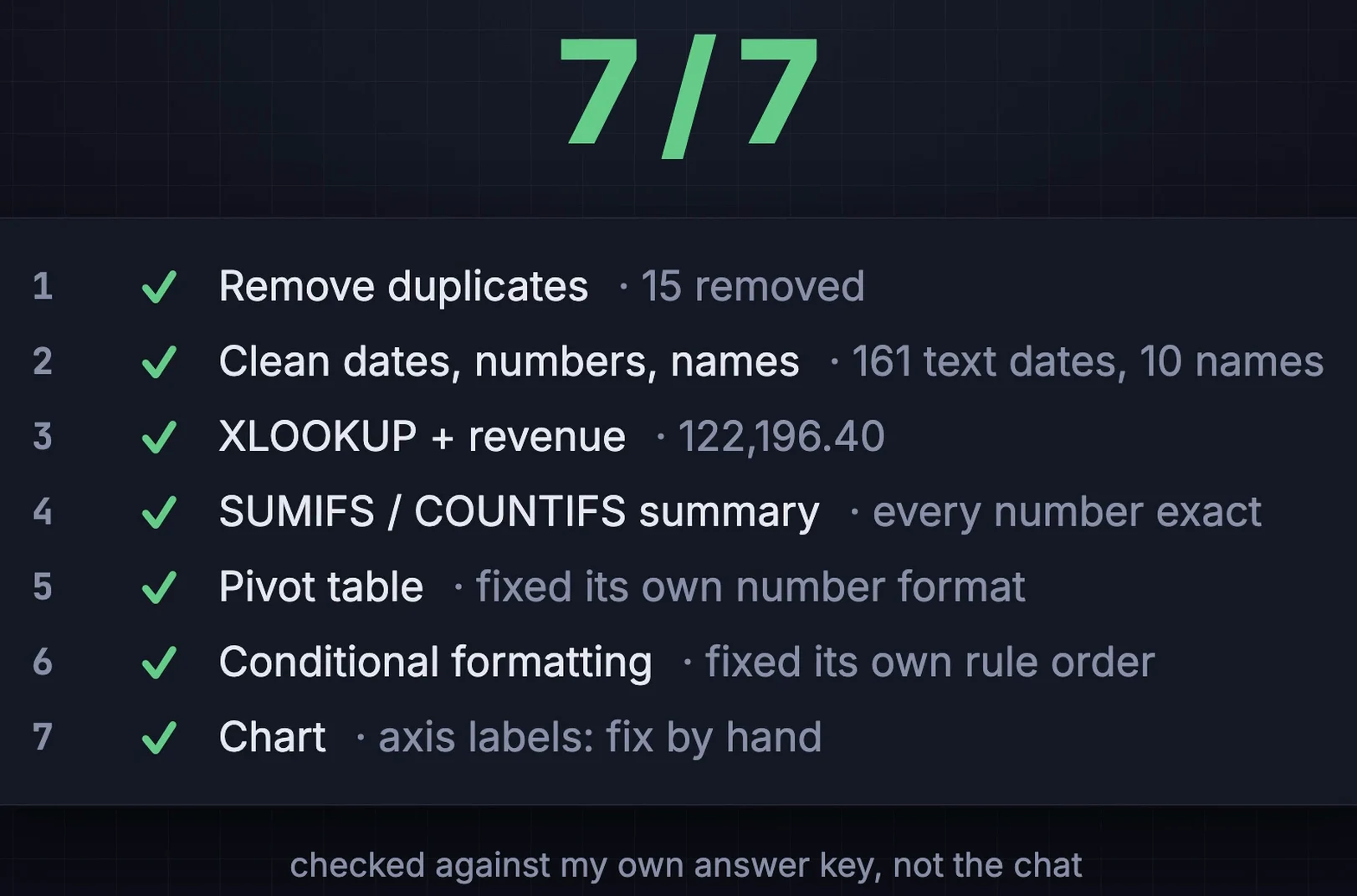
| 1 | Remove duplicates | 15 removed, 285 orders left, every order ID re-checked |
| 2 | Clean dates, numbers, names | 161 text dates, 51 quantities, 10 clean customer names |
| 3 | XLOOKUP + revenue column | Total 122,196.40 - correct to the cent |
| 4 | SUMIFS / COUNTIFS summary | Every category and status exact, as live formulas |
| 5 | Pivot table | Correct, after it fixed its own number format |
| 6 | Conditional formatting | Overdue red, top 10% green, fixed its own rule order |
| 7 | Chart | Correct; the axis labels needed a fix by hand |
What impressed me
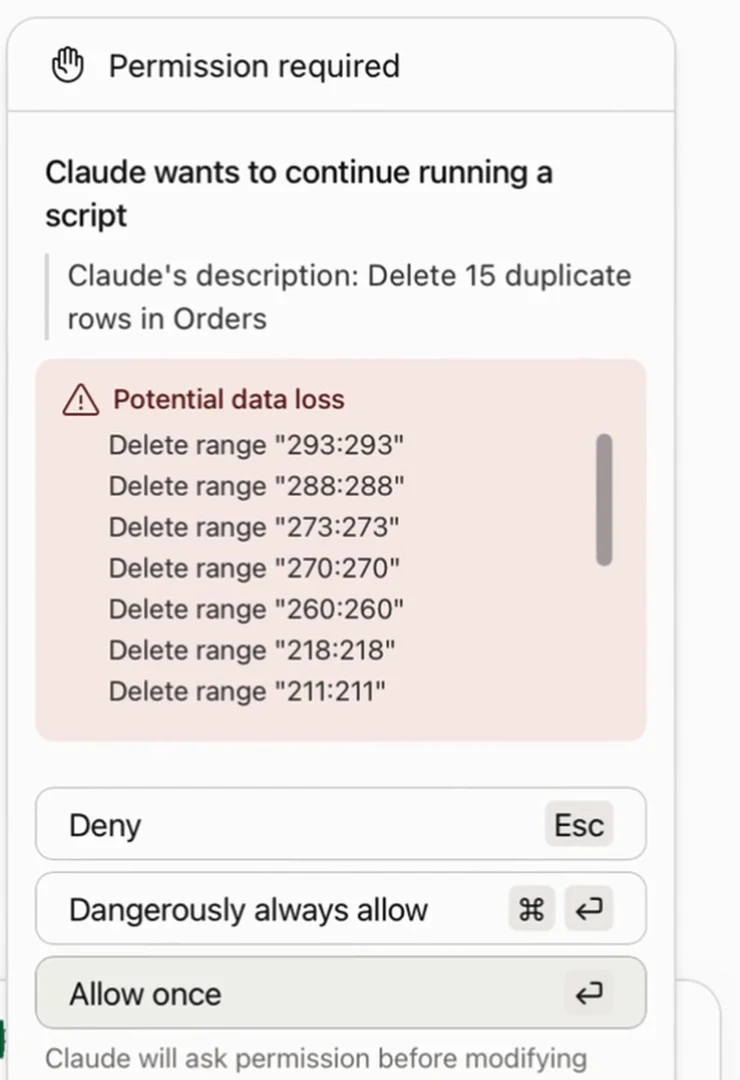
Before removing the duplicates it stopped and asked: potential data loss, Claude wants to delete fifteen ranges - allow once, or deny. That is exactly what I want from something that edits my files. Then the dates: is 04/09 the ninth of April or the fourth of September? It worked it out from the data - some dates were like 01/16, and there is no sixteenth month, so the slash dates must be month first - and still told me which few could be read both ways.
Where it struggled
My Excel uses Latvian number settings, and that broke the display twice. The pivot values first came out looking broken, with commas and dots mixed up; Claude noticed on its own and fixed the number format. The chart axis showed "50000,0" - this time it could not fix it, said so honestly, and told me exactly where to click: Format axis, Number, untick "Linked to source". Which is something you only know if you know Excel.
So did I waste my time?
Kind of no. Claude did every task. But the only reason I could tell it got everything right - and fix that chart axis - is that I know how Excel works. If you do not, you cannot check it, and if it is money or a decision, you have to check it. Microsoft's Copilot does something similar inside Excel (with Microsoft 365 Premium or the business Copilot plan); I did not test it, so I will not tell you which one is better.
The repeatable version: a Claude Code skill
One thing the add-in does not do: every time you get a new file, you click through the same seven requests again. So I built a Claude Code skill that does all seven as one repeatable job, on files, without opening Excel. Point it at the export and it finds the problems, cleans it, and builds the formulas, the summary, the colours and the chart. Same seven out of seven, and next Monday's export takes one command.
clean up sales.xlsx and build me a summaryEverything it writes is a real Excel formula or rule, so the file stays live when the data changes.
Excel Fixer - the skill, the messy test file and my answer key
The whole report as one repeatable command, plus everything you need to check any AI tool yourself.
- skill/excel-fixer - the Claude Code skill (SKILL.md + xlkit.py).
- messy-sales.xlsx - the ugly test file from the video: 300 orders, 15 duplicates, 171 text dates.
- answers.json - my answer key, so you can grade any AI tool yourself.
- run_7_tasks.py - all seven tasks as one worked example.
Patreon members ($5/month) get it with all my other tools, or buy just this one for $9.
Honest limitations
- The skill cannot make a real PivotTable - it builds a live SUMIFS grid instead; a real one is one click in Excel.
- It works on files, not on the Excel window you have open. For one-off questions inside a workbook, the official Claude for Excel add-in is the better pick.
- Regional number formats (like Latvian commas) can still trip up charts - check the axis labels.
- Copilot was not tested - mentioned for context only.
Watch the video
All seven tasks on screen, including the safety prompt and the Latvian number-format struggles.
FAQ
Is Claude for Excel accurate?
In my test, yes: 7 of 7 tasks correct on a deliberately messy file, every number checked against an answer key. It caught and fixed two of its own formatting problems and was honest about the one it could not fix.
Does Claude for Excel need a separate subscription?
No. It works with a normal paid Claude plan; you install it from Excel's Add-ins and sign in with your Claude account.
Can Claude make a real pivot table in Excel?
The add-in made a real PivotTable. The Claude Code skill builds a live SUMIFS grid instead, because the Python library it uses cannot create real PivotTables.
Is Claude for Excel better than Copilot?
I did not test Copilot, so I cannot say. Copilot comes with Microsoft 365 Premium or the business Copilot plan.
Related
Spreadsheets doing a job a system should do?
Weekly exports, copy-paste reports and files nobody trusts are exactly what I turn into reliable tools at KorFlux - with or without AI on top.