A free Wispr Flow alternative that runs offline on Mac, Windows and Linux
Hold a key, talk, let go - and your words appear wherever your cursor is. Mail, Slack, Word, the browser, Claude Code. That is the whole idea behind Wispr Flow, and it is a good one. It is also $15 a month, and everything you say goes to a server.
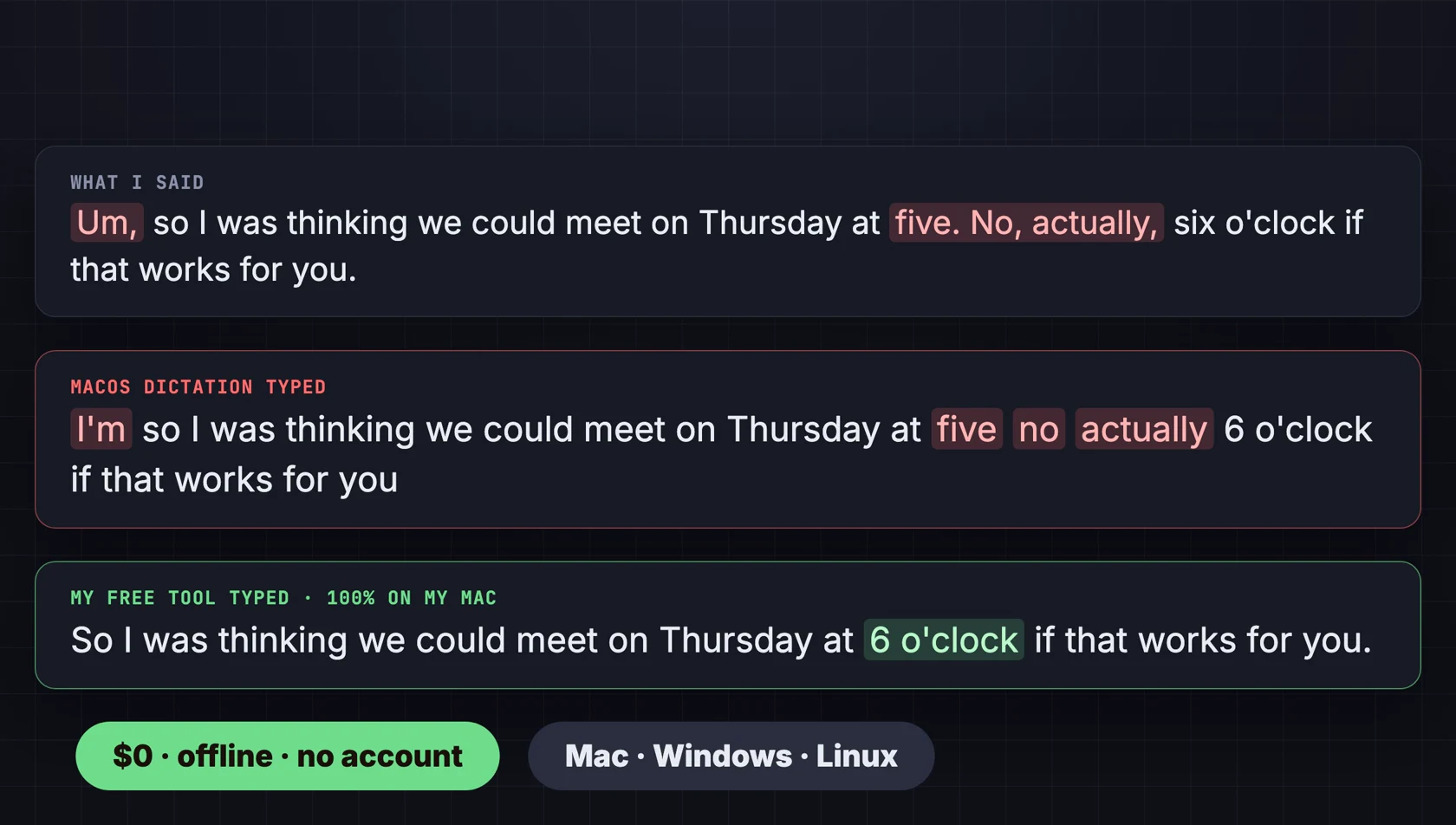
I have been using dictation apps for a while, and most of them cost around that much. So I wanted to see if I could build the same thing for free, running fully on my own computer. It turns out Whisper is really fast on Apple Silicon, a small local language model can clean up the filler words, and the same idea works on Windows and Linux too. This is what came out of it, and how it does against the dictation built into macOS.
What it does
- Hold to talk. Hold Right Option on a Mac (Right Ctrl on Windows and Linux), talk, let go. You hear a short sound when it starts and stops listening.
- Speech to text with Whisper - the large-v3-turbo model on a Mac or an NVIDIA graphics card, a smaller English model on any PC's processor.
- Optional cleanup with a small local model (Qwen 2.5): it removes um and uh, fixes punctuation and capitals, and when you correct yourself it keeps only the correction. It never answers your question or rewrites your wording.
- Pastes where your cursor is, in any app, then gives you your old clipboard back.
- Your own dictionary - names, brands and jargon in a text file, so Whisper spells them your way.
There is no account, no word limit and no subscription. Once the models are downloaded, nothing you say leaves the computer. For comparison, Wispr Flow is $15 a month ($12 billed yearly), and its free plan stops at 2,000 words a week (prices as of October 2026).
Mac, Windows and Linux: what runs where
Under the hood it is a little different on each system, because the fastest local engine is different on each.
| Mac (M1 or newer) | Windows 10/11 & Linux | |
|---|---|---|
| Speech to text | Whisper large-v3-turbo on Apple MLX | faster-whisper: large-v3-turbo on an NVIDIA GPU, small.en on the CPU |
| Cleanup | Qwen 2.5, built in | Qwen 2.5 in Ollama (free app) |
| Hold key | Right Option | Right Ctrl |
| Needs | uv + three permissions | uv + Ollama (Linux: an X11 session) |
The graphics card is picked up automatically when its CUDA libraries work; otherwise it simply runs on the processor, so it works on any normal PC. The cleanup model is chosen by memory: the 7B version on 16 GB machines and up (it gets self-corrections right), the faster 3B version below that.
The real test: an email
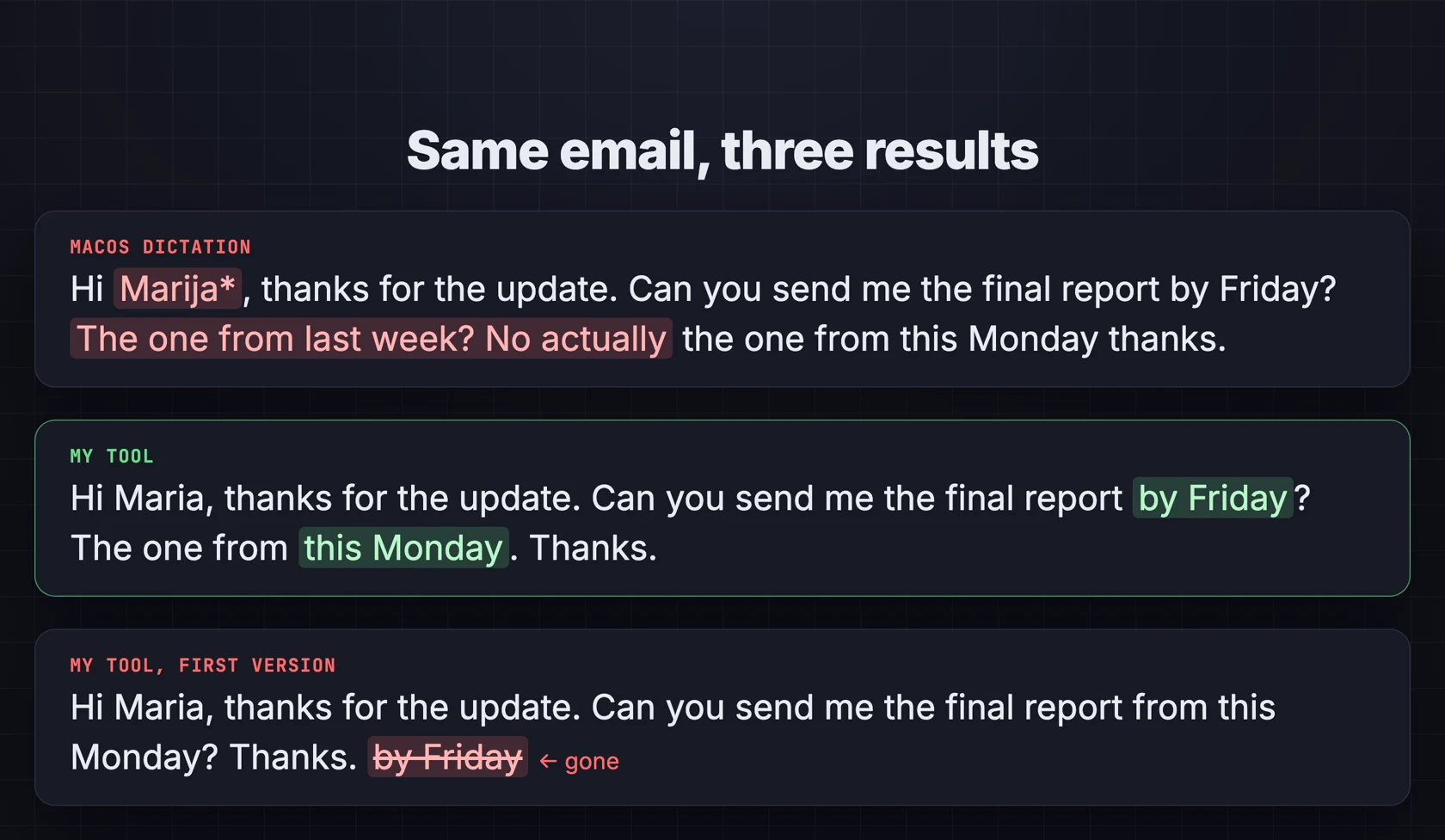
The sentence I care about is not the easy one. It is the one where I change my mind: "Can you send me the final report by Friday? The one from last week? No, actually, the one from this Monday." Same email, dictated with macOS and with this tool.
The safety net
That first-version mistake is the worst kind, because the text looks perfect and you would just send it. So the tool now checks every cleanup: if the cleaned text has lost a detail you said, or contains a single word you never said, it throws the cleanup away and pastes your own words - just without the ums. A dictation tool should never make things up.
How fast is it?
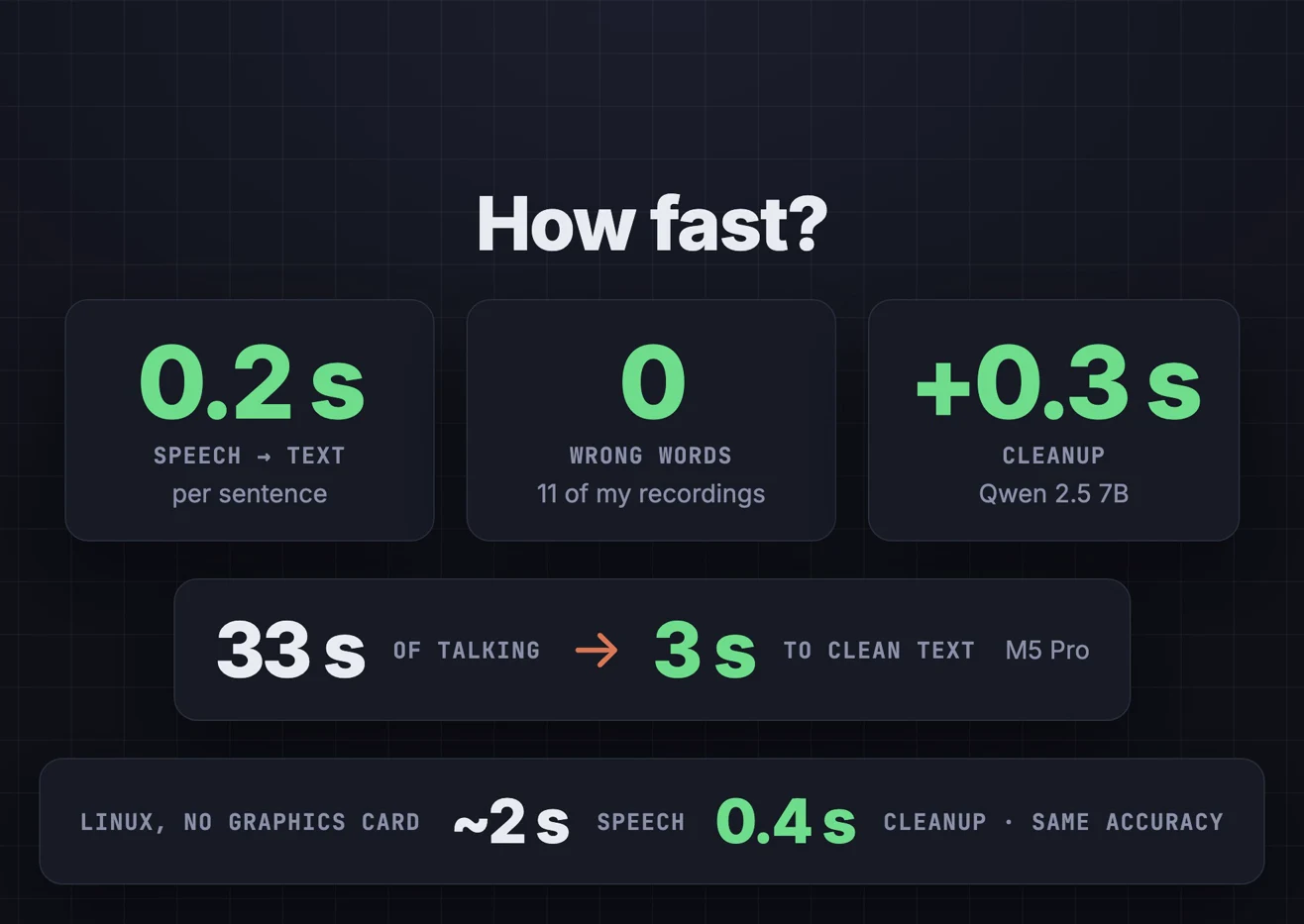
I tested it on eleven of my own recordings plus the clips from the video, on two machines.
| Machine | Speech to text | Cleanup |
|---|---|---|
| Mac, M5 Pro, 24 GB | about 0.2 s per sentence | 0.2-0.6 s |
| Linux PC, no graphics card (15 CPU threads) | about 2 s per sentence | 0.4 s (3B model) |
Accuracy was the same on both. A longer one: 33 seconds of me talking, filler words and all, became clean text about 3 seconds after I let go of the key.
Setting it up
Every system needs one free tool, uv. It installs Python and everything else the tool needs, so there is nothing to configure by hand. The first run downloads the models once.
Mac (Apple Silicon)
curl -LsSf https://astral.sh/uv/install.sh | sh
uv run src/dictate.py --clean
macOS then asks for three permissions for your terminal app, in System Settings › Privacy & Security: Microphone (to hear you), Input Monitoring (to notice the key) and Accessibility (to paste). Allow them, start it again, hold Right Option and talk.
Windows 10/11
powershell -ExecutionPolicy ByPass -c "irm https://astral.sh/uv/install.ps1 | iex"
uv run src\dictate.py --clean
Install Ollama first for the cleanup - it is a normal installer and sits in the tray. Run the command in the tool's folder (right-click › Open in Terminal). If Windows asks about the microphone, allow it under Settings › Privacy & security › Microphone. Then hold Right Ctrl and talk.
Linux (Ubuntu, Fedora, Mint)
sudo apt install libportaudio2 xclip
curl -LsSf https://astral.sh/uv/install.sh | sh
curl -fsSL https://ollama.com/install.sh | sh
uv run src/dictate.py --clean
One catch on Linux: only an X11 session lets an app see a global hotkey and paste into other apps. If your desktop runs Wayland - the default on recent Ubuntu and Fedora - pick "Ubuntu on Xorg" (or your desktop's X11 session) on the login screen.
Or let Claude Code do it
The download includes a Claude Code skill. Open the folder in Claude Code and say
set up free dictation - it checks your system, installs what is missing and
tests your mic. Say start it at login and it creates a launch agent on Mac, a
Startup shortcut on Windows or an autostart entry on Linux.
Free Dictation - the tool, the setup skill and the test clips
Free to run forever: no subscription, no account, no word limit. You buy it once and it is yours - one Python file you can read, change and keep.
- dictate.py - Mac, Windows and Linux in one file, runs with uv.
- The Claude Code skill - installs it, tests your mic, starts it at login on every system, and troubleshoots "nothing gets pasted".
- My test clips - the meeting, the email, the Claude Code prompt and the long story from the video, plus 11 short sentences, to benchmark it on your own machine.
- Setup for every system in the README, with all the options.
Patreon members ($5/month) get it with all my other tools, or buy just this one for $9.
Honest limitations
- Without a graphics card it is slower. A couple of seconds per sentence on a PC's processor, not a fraction of one. Still the same accuracy.
- Linux needs X11 for the global hotkey and pasting, because Wayland does not let apps do that.
- No phone app. Intel Macs and Windows on ARM laptops are not supported.
- Wispr Flow has more polish - phone apps, per-app styles and plenty of extras. For the thing I use every day - hold a key, talk, get clean text - I do not miss any of it.
- Tested on my Mac and on Ubuntu Linux. Windows runs the same code path as Linux; if anything misbehaves on your PC, tell me in the Patreon comments and I will fix it.
Watch the video
The side-by-side tests with macOS dictation, how it works, and the setup on each system.
FAQ
Is there a free alternative to Wispr Flow?
Yes - this one does the same core job (hold a key, talk, clean text where your cursor is) with Whisper and a small local model on your own computer, with no subscription and no word limit.
Does it work offline?
Yes. After the first run downloads the models, both the speech to text and the cleanup run locally. Nothing you say is sent anywhere.
Does it work on Windows and Linux?
Yes: Windows 10/11 on x64 PCs and Linux with an X11 session, using faster-whisper and Ollama. On a Mac it needs Apple Silicon (M1 or newer).
Do I need a graphics card?
No. An NVIDIA card is used automatically if you have one; otherwise it runs on the processor at about 2 seconds per sentence.
Related
Want a local AI tool built for your team?
This is a personal-scale version of what I do at KorFlux: small, practical tools that keep data on your own machines - monitoring, integrations, or an internal assistant that should never send anything to the cloud.