Obsidian YouTube notes that write themselves: any video to a linked note, free and local
I watch a lot of tutorials, and a week later I remember almost nothing. Summarizer websites give you a wall of text that knows nothing about your notes, and half of them want a subscription. So I built a small Claude Code skill: paste a YouTube link, and about a minute later a linked note is sitting in my Obsidian vault, every key point with a timestamp that jumps to that exact moment in the video.
What you need: Mac (Apple Silicon), Windows or Linux. Claude Code with a paid Claude plan (Pro or higher) or an Anthropic API key, plus uv and Obsidian, both free. uv installs Python, yt-dlp and Whisper by itself.
How it works
- You give it a link: a video, a whole playlist, or a local audio or video file.
- It gets the transcript. YouTube's captions when the video has them. No captions, or a local recording: it downloads the audio and transcribes it on your own computer with Whisper (Apple MLX on a Mac, faster-whisper on Windows and Linux).
- Claude reads the transcript and the titles of your existing notes, then writes the note: a short summary, key points with timestamps, quotes word for word, a to-do list when the video suggests something concrete, and links to the notes you already have.
Every timestamp comes from the transcript, it never makes one up. When a big topic in the video has no note yet, it lists it under "New notes to create" instead of making a broken link.
Install
Two steps. First uv, one free installer:
# Mac and Linux
curl -LsSf https://astral.sh/uv/install.sh | sh

# Windows (PowerShell)
powershell -ExecutionPolicy ByPass -c "irm https://astral.sh/uv/install.ps1 | iex"
Then copy the skill folder into your vault, into .claude/skills. Obsidian ignores
folders that start with a dot, so nothing shows up in your notes.
mkdir -p .claude/skills
cp -r ~/Downloads/obsidian-video-notes/skill/video-note .claude/skills/
Three videos at once
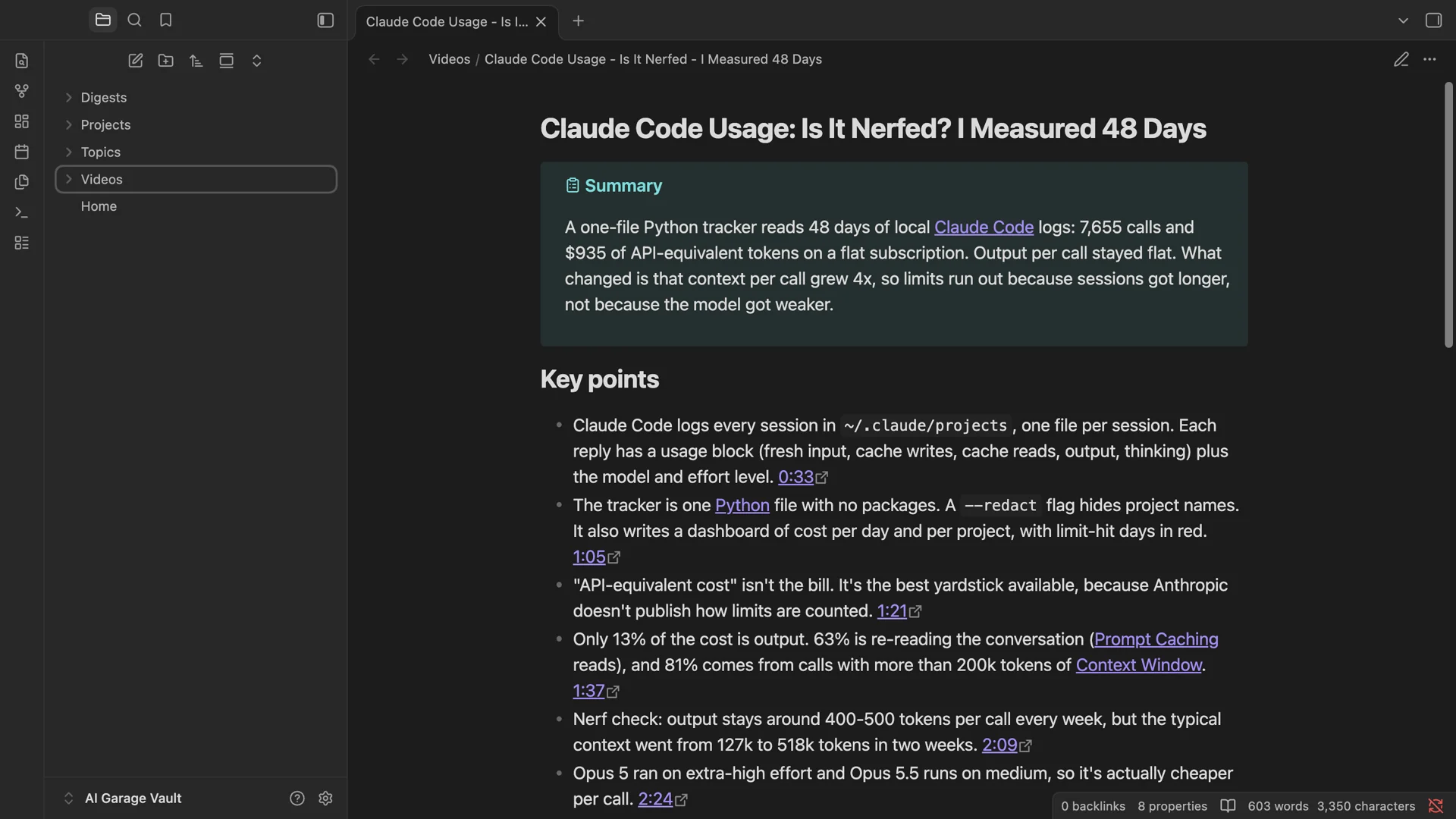
I started Claude Code inside my vault and gave it the three videos from my own channel:
Make notes of these three videos: https://youtu.be/2DtbHDNtYeg https://youtu.be/pLrNzzKl4Po https://youtu.be/cCROqMTvGywIt fetched the captions, read every transcript and wrote three notes in about a minute.
Why Obsidian and not a summary website
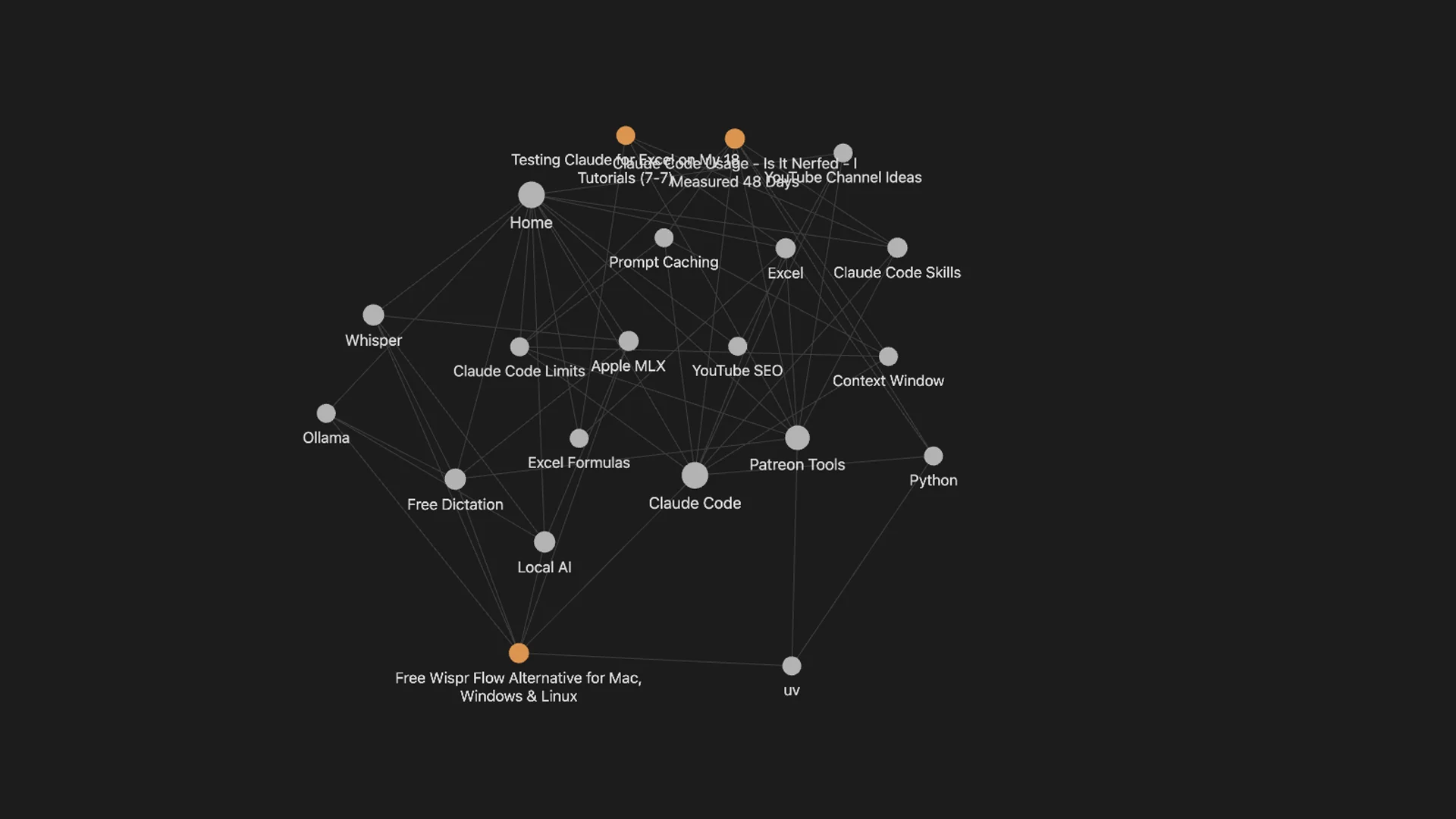
In the graph view, the new videos plug straight into what I already know. The Excel video connects to my Excel notes, the dictation video to Whisper and Ollama, the usage video to Context Window and Prompt Caching.
No captions? Whisper
When a video has no captions, it falls back to Whisper. Forced on my four-minute video, it took about ten seconds on my Mac, and nothing gets uploaded. It works on a local file too, like a recording of a meeting.
uv run .claude/skills/video-note/fetch.py --whisper https://youtu.be/pLrNzzKl4Po --vault .A weekly digest
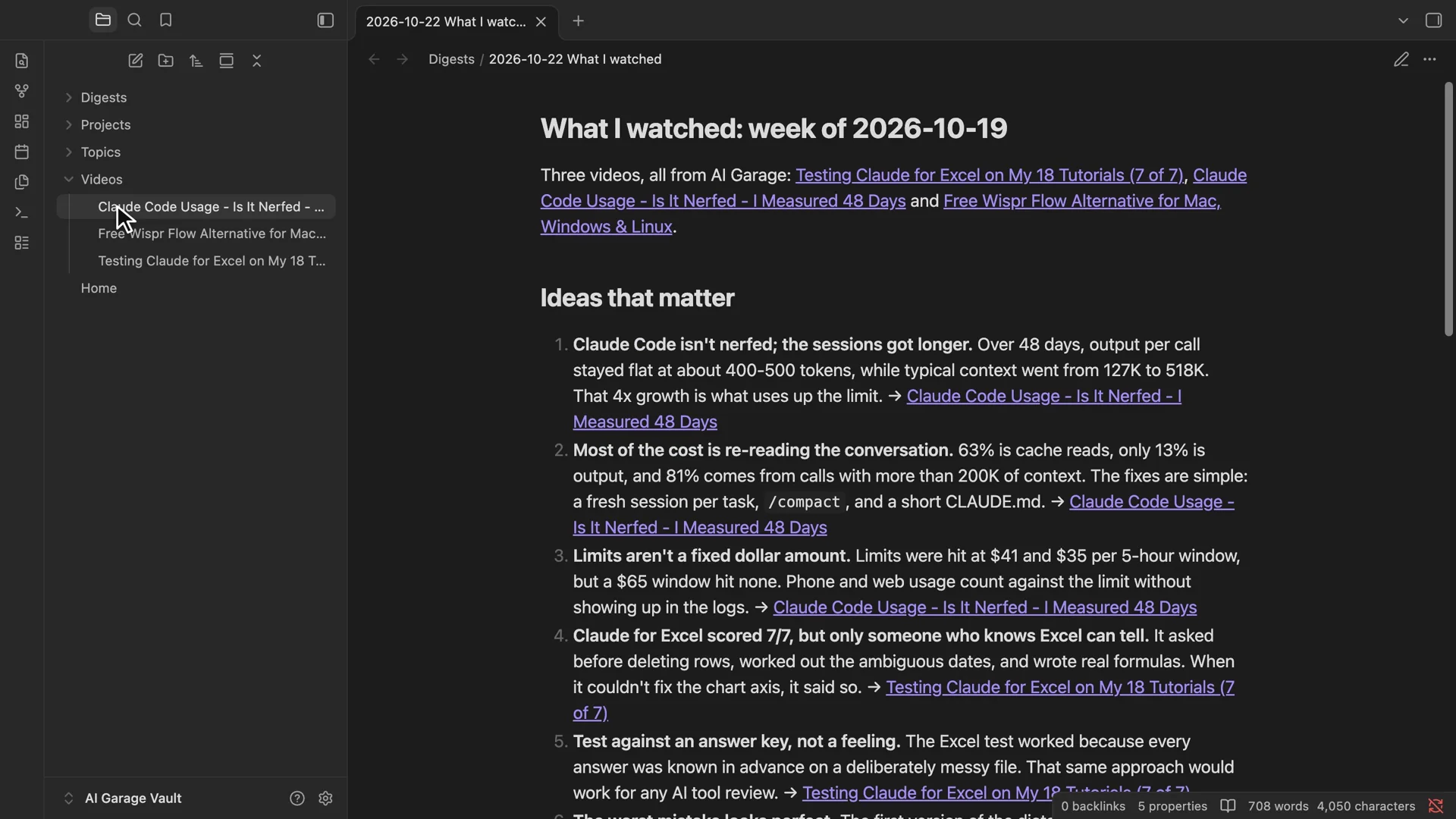
Once a week I ask: "What did I watch this week?" It reads my video notes and writes one digest with the ideas that matter most, each linked back to its video.
Obsidian video notes - the skill and my demo vault
Any video, playlist or recording to a linked note, on Mac, Windows or Linux.
- The /video-note Claude Code skill - paste a link, get the note in your vault.
- fetch.py - captions or local Whisper transcription, with timestamps.
- Playlists and a weekly digest - one note per video plus a hub note, and "what I watched" on request.
- The demo vault from the video - with its Obsidian settings.
Patreon members ($5/month) get it with all my other tools, or buy just this one for $9.
Honest limitations
- Claude Code writes the note, so the transcript text goes to Claude, like anything else you do in Claude Code. The transcription itself stays local.
- Members-only and age-restricted videos don't work.
- Without an NVIDIA GPU, Windows and Linux use a smaller Whisper model for videos with no captions: slower and a bit less accurate than on a Mac.
Watch the video
Three of my own videos to linked notes, the graph, Whisper for videos without captions, and the weekly digest.
FAQ
How do I turn a YouTube video into Obsidian notes?
Install the free video-note skill for Claude Code, start Claude Code inside your vault and paste the link. It fetches the captions (or transcribes the audio locally with Whisper) and writes a note with a summary, timestamped key points, quotes and links to your existing notes.
Does it work on Windows and Linux?
Yes. It works on Mac (Apple Silicon), Windows and Linux. On a Mac, Whisper runs on Apple MLX; on Windows and Linux it uses faster-whisper, on an NVIDIA GPU if you have one, otherwise the CPU. uv installs everything it needs.
Do I need a Claude subscription?
Claude Code writes the note, so you need Claude Code with a paid Claude plan (Pro or higher) or an Anthropic API key. The transcript script itself runs without Claude, and Obsidian and uv are free.
Does it upload my videos or recordings?
No. Captions come straight from YouTube, and audio without captions is transcribed with Whisper on your own computer. Only the transcript text goes to Claude, like anything else you do in Claude Code.
Can it do a whole playlist?
Yes. Paste a playlist link and it writes one note per video plus a hub note with a one-line takeaway for each. Once a week you can ask for a "what I watched" digest.
Related
Want your team's knowledge to file itself?
Turning recordings, docs and meetings into notes people actually find again is the kind of automation I build at KorFlux.