A free YouTube keyword research tool for small channels: can a new video rank?
Before I make a video, I check one thing: can a small channel like mine actually rank for this keyword? My AI Garage channel is brand new, 48 subscribers. YouTube doesn't recommend my videos yet, so almost every view comes from search. Tools like vidIQ do keyword research, but their Boost plan is $199 a year. I wanted the one answer a new channel needs, for free. This tool gives it in about 20 seconds per keyword: green means go, red means don't bother.
What you need: any Mac, Windows or Linux computer with Python 3.9 or newer. The tool itself needs no Claude subscription. The Claude Code skill (describe a video, get the keyword and three titles) needs Claude Code with a paid Claude plan (Pro or higher) or an Anthropic API key.
How it works
It uses two things YouTube shows anyone:
- Autocomplete: what people really type into the search box. It asks for the keyword and the keyword plus every letter from a to z.
- The search results: how many views the top videos have, how old they are, and how many titles already use those words.
Old videos and few matching titles? Beatable. Big new videos? Skip. It turns that into a score out of 100:
| Part | Points | What it measures |
|---|---|---|
| Demand | 40 | Median views of the top 10. 100 views = 0, 100K or more = 40. |
| Fresh competition | 25 | Videos under 6 months old with 20K+ views. None = 25, four or more = 0. |
| Title match | 15 | Top-10 titles that already use every word of the keyword. None = 15, all ten = 0. |
| Age | 20 | How old the top 10 are. 2 years or more = 20: old results are the easiest to replace. |
GO is 65 or more, MAYBE 45 to 64. SKIP is under 45, or a top 10 with a median under 1K views (nobody watches it), or four or more strong new videos (a channel YouTube is pushing right now owns it).
Install
It's one Python file. No packages, no API key, no account. Copy the skill folder into
.claude/skills, and that's the whole setup:
mkdir -p .claude/skills
cp -r ~/Downloads/youtube-keyword-tool/skill/youtube-keywords .claude/skills/
Put it in ~/.claude/skills instead to use it in every project.
One keyword
The video I was making next was about converting PDF to Excel, so I checked that:
python3 .claude/skills/youtube-keywords/kw.py "convert pdf to excel"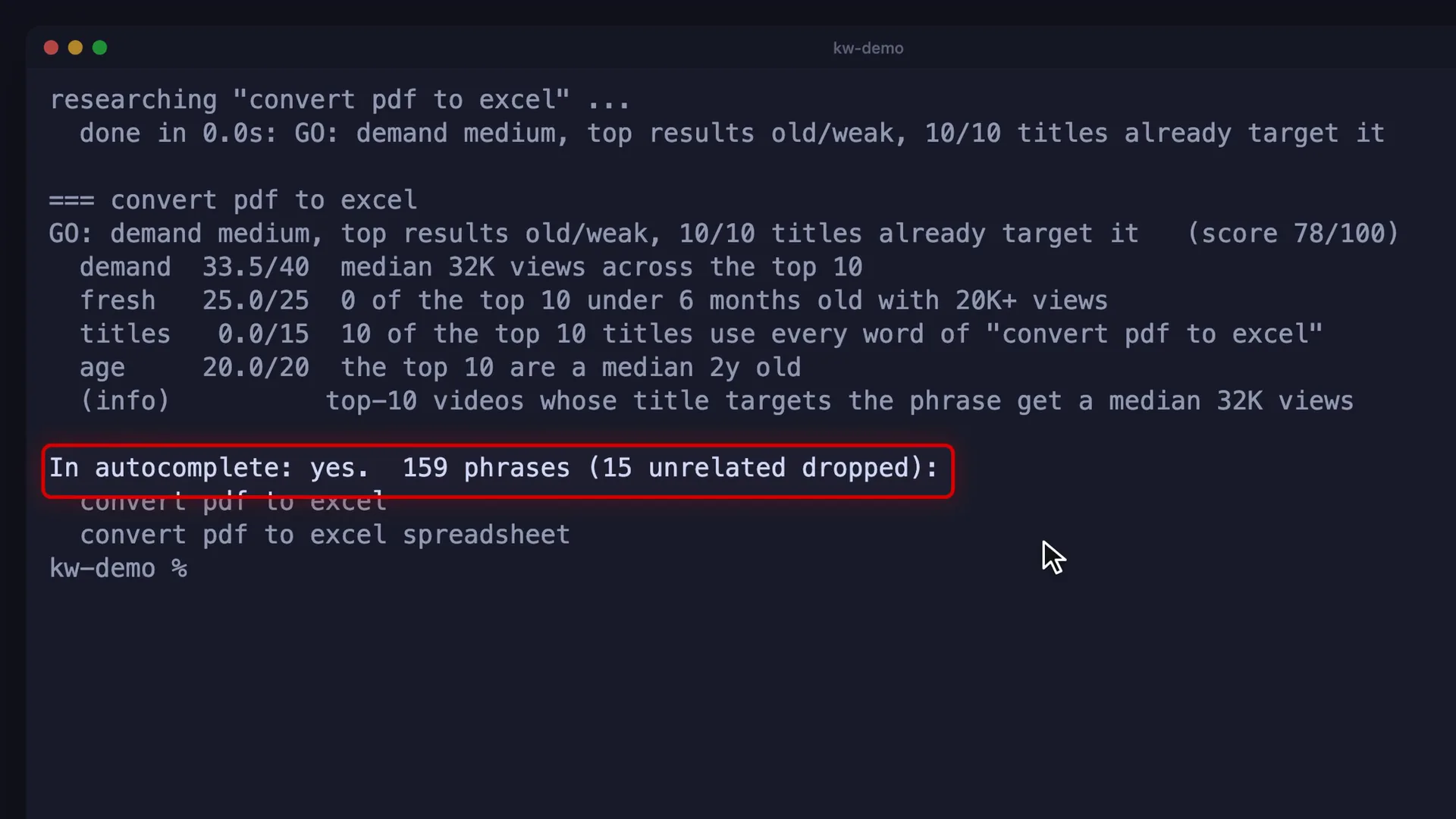
Compare keywords
Give it a few ideas at once and it ranks them side by side and writes an HTML report:
python3 .claude/skills/youtube-keywords/kw.py "obsidian youtube notes" "claude code obsidian" "convert pdf to excel" --compare --html report.html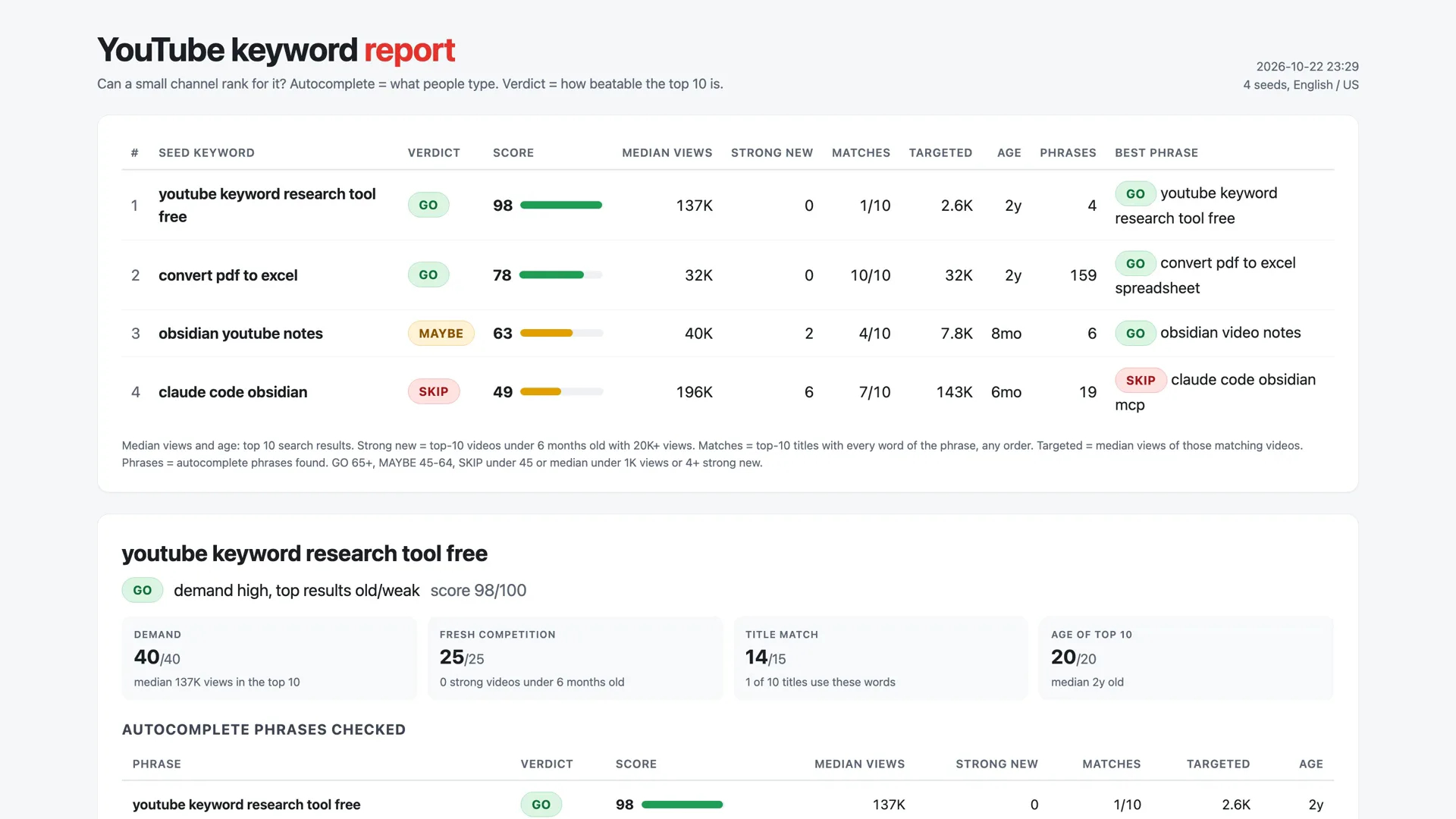
- Obsidian YouTube notes is a MAYBE: two strong videos came out recently. But it found a better phrase people type: obsidian video notes, a GO.
- Claude Code Obsidian is a SKIP: six of the top ten are big, recent videos. A new channel won't get in there.
The number to watch: targeted
For the keyword of my own video, the top ten have a median of 137K views. But those are general YouTube tips. The videos that actually aim at the phrase get about 2.5K. That's the realistic number, so the report shows it as "Targeted": the median views of the top videos whose title uses every word of the keyword.
Ask Claude Code
Because it's a skill, I just describe the video:
Find a keyword and three titles for my next video: converting PDF to Excel, free and offline.Claude runs the comparison, picks the phrase that's in autocomplete and beatable, and puts it at the start of three title ideas. I used it to pick the title of my video about this tool too.
YouTube keyword research tool - kw.py and the Claude Code skill
The exact tool from the video, for any channel, on Mac, Windows or Linux.
- kw.py - one file, no packages, no API key: autocomplete, the top 20 results and a GO, MAYBE or SKIP verdict.
- --compare --html - the side-by-side report from the video.
- The Claude Code skill - describe a video, get the keyword and three titles.
- The demo runs - the five keywords from the video, as text, JSON and the HTML report.
Patreon members ($5/month) get it with all my other tools, or buy just this one for $9.
Honest limitations
- No search volume numbers. Autocomplete only proves that people type a phrase.
- It reads YouTube's public pages, not an official API, so it can break when YouTube changes them.
- English and US results only.
- It doesn't know your channel: subscribers, click-through and watch time matter more than any keyword, so treat GO as "worth trying", not a promise.
Watch the video
One keyword, the compare report, the targeted number and the Claude Code skill, in under three minutes.
FAQ
Is there a free YouTube keyword research tool?
Yes. This one is a single Python file that reads YouTube's public autocomplete and search results, with no API key and no account. It shows what people type and gives each keyword a GO, MAYBE or SKIP verdict for a small channel. vidIQ's Boost plan, for comparison, is $199 a year.
How do I know if a small channel can rank for a keyword?
Look at the top 10 search results. Old videos and few titles that use the phrase mean it is beatable. Several big videos from the last six months mean a channel YouTube is pushing right now owns it. The tool counts exactly that and turns it into a score.
Do I need a Claude subscription?
Not for the tool: kw.py runs on its own with Python 3.9 or newer and writes the report. The Claude Code skill, where you describe a video and get the keyword plus three titles, needs Claude Code with a paid Claude plan (Pro or higher) or an Anthropic API key.
Does it show search volume?
No. YouTube doesn't publish search volume for free. Autocomplete proves people type a phrase, and the views of the top videos show people watch it, but neither is a monthly search count.
Does it work on Windows and Linux?
Yes. It is one Python file that uses only the standard library, so it runs anywhere Python 3.9 or newer runs. On Windows, type python instead of python3.
Related
Want research like this automated for your team?
Small tools that pull public data and turn it into one clear decision are the kind of automation I build at KorFlux.